Key takeaways
- A computer speaker is an output device that converts the computer's audio signals into sound.
- Internal speakers are built into laptops and some desktops; external speakers connect by cable, USB or Bluetooth.
- Connect wired speakers to the green audio jack or USB, Bluetooth speakers through pairing in Settings.
- Most sound problems are fixed by choosing the right output device, checking volume and mute, and updating drivers.
- As a guest speaker in a computer engineering class, bring real projects, a live demo and practical career advice.
A speaker in a computer is an output device that turns the computer's digital audio into sound you can hear, for music, videos, calls, alerts and accessibility features such as screen readers. Laptops have small built-in speakers; desktops usually use external speakers connected by cable, USB or Bluetooth. Since this site is about speaking, the last section covers the other kind of speaker: giving a guest talk in a computer engineering class, which I have done at more than 20 campus sessions. This page also covers setup, Bluetooth and fixes.
What is a speaker in a computer?
A computer speaker is a hardware output device that converts electrical audio signals from the computer's sound card or audio chip into sound waves. It lets the computer play music, video soundtracks, voices in calls, system sounds and spoken text.
Also asked as: what is speaker in computer · how to use my computer speaker · how to fix speaker in computer
Speakers can be internal, built into the case or laptop, or external, sitting on the desk. External sets range from simple stereo pairs to systems with a subwoofer for bass. Some are passive and draw power from the computer through USB, while larger ones have their own power supply and amplifier. Headphones and earphones do the same job for one listener. Inside the speaker, an electrical signal moves a coil attached to a cone, which pushes air to create the sound waves we hear.
What is a computer speaker, in a short answer?
A speaker is an output device of a computer that produces sound by converting electrical signals from the computer into audible sound waves.
Also asked as: what is speaker in computer short answer
For exams and assignments, add an example and type: "Examples include laptop built-in speakers, desktop stereo speakers and Bluetooth speakers. Speakers are output devices because they receive data from the computer and present it to the user as sound, unlike microphones, which are input devices." Diagrams typically show the computer's sound card connected to a speaker that outputs sound waves.
What is an internal speaker in a computer?
An internal speaker is built inside the computer: laptops and all-in-one desktops have small stereo speakers in the case, and many desktop motherboards have a tiny beeper speaker used for startup diagnostic beeps.
Also asked as: what is internal speaker in computer
Laptop speakers are convenient but small, so bass and volume are limited. The motherboard beeper is not for music; it signals hardware problems at startup with beep patterns, such as memory errors, which manuals explain. Some newer desktops omit even this beeper and use diagnostic lights instead. If your desktop has no external speakers, it may produce no normal audio at all, because only the diagnostic beeper is built in.
What is an external speaker in a computer?
An external speaker is a separate device connected to the computer by a 3.5 mm audio cable, USB, HDMI through a monitor, optical cable or Bluetooth. External speakers usually give louder, fuller sound than built-in ones.
Also asked as: what is external speaker in computer
Types include 2.0 stereo pairs, 2.1 sets with a subwoofer, surround sound systems for gaming and films, USB-powered compact speakers, soundbars, and wireless Bluetooth speakers. Many monitors also have speakers that play audio sent over HDMI or DisplayPort. Choose based on desk space, room size and whether you need wireless connectivity. For video calls and online classes, clear speech matters more than bass, so even modest speakers or a good headset are enough.
How do I connect speakers to a computer?
For wired speakers, plug the 3.5 mm cable into the computer's audio output jack, usually green or marked with a headphone icon, or plug USB speakers into a USB port. Power on the speakers, then select them as the output device in sound settings.
Steps:
- Connect power to the speakers if they need it.
- Plug the audio cable into the output jack, not the microphone jack.
- On Windows, open Sound settings and choose the speakers under Output.
- On macOS, open Sound settings and select the device under Output.
- Play a test sound and adjust volume on both computer and speakers.
How do I connect a Bluetooth speaker to a computer?
Put the speaker in pairing mode, then on Windows open Settings, Bluetooth and devices, Add device, and select the speaker; on macOS open Bluetooth settings and click Connect next to the speaker. Then choose it as the sound output.
Also asked as: how to connect speaker in computer · how to connect bluetooth speaker in computer
If it does not appear, make sure Bluetooth is turned on, the speaker is in pairing mode and close to the computer, and not already connected to a phone. Remove old pairings and try again if connection fails. Bluetooth can add slight audio delay, which matters for gaming or video calls; wired connections avoid it. Charge the speaker, since low battery causes dropouts.
How do I set up speakers in a computer?
After connecting, set the speakers as the default output device in sound settings, adjust the volume, test left and right channels, and configure any extra features, such as surround sound or enhancements, in the sound control panel or manufacturer's app.
Also asked as: how to set up speaker in computer
On Windows, the Sound control panel lets you set defaults and test speakers; for surround systems, choose the correct speaker configuration. On macOS, Audio MIDI Setup handles advanced configuration. Position stereo speakers on either side of the screen at ear height for the best sound. Update audio drivers from the computer maker for full feature support.
How do I use my computer's speakers?
Use the volume controls on the keyboard or taskbar, choose the output device in sound settings, and adjust levels for individual apps in the volume mixer. Speakers then play all system audio: media, calls, notifications and screen readers.
Useful features: the Windows volume mixer sets separate levels per app; spatial sound settings improve headphone audio; accessibility options such as mono audio help listeners with hearing differences; and text-to-speech tools read documents aloud through the speakers. For calls, using headphones prevents echo picked up by the microphone.
How do I fix computer speakers that are not working?
Check the basics first: correct output device selected, volume up and not muted, speakers powered and cables in the right jack. Then run the sound troubleshooter, update or reinstall audio drivers, and test the speakers on another device.
More steps:
- Unplug headphones, which can override speakers.
- Check the app's own volume and output settings.
- Restart the computer and the speakers.
- Re-pair Bluetooth speakers.
- Disable audio enhancements if sound is distorted.
- Check device manager for driver errors.
If speakers work on another device but not yours, the problem is the computer's settings, drivers or audio port. If they fail everywhere, check the cable and power supply before replacing the speakers.
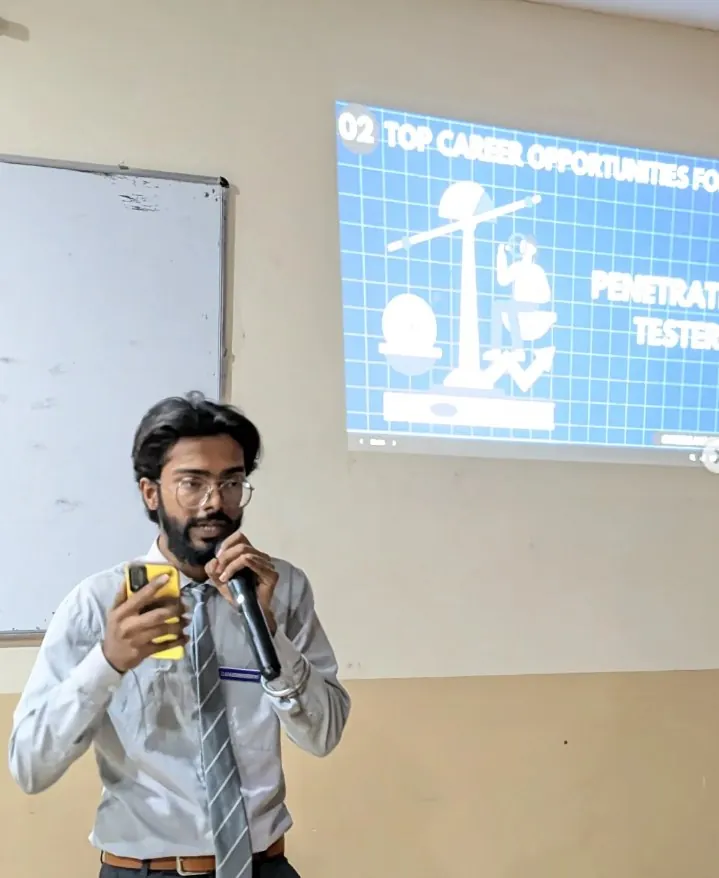
How do I give a guest talk in a computer engineering class?
Contact the faculty or department with a clear topic, short bio and session format, then prepare a practical talk: a real project, a live demo, lessons from building it, and career advice students can act on. Keep it interactive with questions and examples.
Also asked as: how to guest speaker at computer engineering class
What works with engineering students: show working systems, such as an AI app you built, explain decisions and failures honestly, map skills to roles, and share a roadmap they can follow. Leave time for questions, which are often the most valuable part. In my campus sessions, a concrete three-year roadmap and live project demos get far more engagement than theory slides.
Sources

GenAI engineer and AI product builder with 2+ years shipping production-grade AI systems: RAG pipelines, fine-tuned LLMs, hybrid retrieval and multi-modal apps across vision, speech and OCR, architected end to end from ingestion to deployment. Leads engineering for SCULT INDIA's 14-member team, founded the 500+ member TechVerse Enclave community and has mentored 200+ students. Three hackathon first prizes: Changethon 2025 (IIT Roorkee), Product Genesis at Vividhotsava 2025 (CSJMU) and BYTEBATTLE (MeetKats).
Open to GenAI roles, hackathon judging, mentorship sessions and guest talks at colleges. For campus sessions the inviting institution covers the visit end to end: travel (a First AC train ticket for journeys up to five hours, a flight for anything longer), accommodation, meals, and pickup and drop; the honorarium and workshop fees are negotiable on WhatsApp or on the call, and requests are welcome from institutions that can cover the visit this way. Email pranjulrathour41@gmail.com.